Many a times you would get a "Bind Exception", "Address already in use" kind of errors and need to find the process that's using the port. For example say the port is 8080. The following command will get you the pid and program name as well.
netstat -nlept | grep "8080"
The result might look something like this...
Proto Recv-Q Send-Q Local Address Foreign Address State User Inode PID/Program name
tcp6 0 0 :::8080 :::* LISTEN 1000 994652 4024/java
Where 4024 is the pid and it's a java app.
wikipedia

Wednesday, February 24, 2010


Tuesday, February 2, 2010
Upgraded process manager for Linux

Monday, January 4, 2010
XML parsing in Java and Groovy
XML is everywhere. Somebody said that XML is like violence. if it doesn't work for you then you are not using enough of it! Well like it or not you have to deal with XML everywhere. To say that XML handling in java is not easy is an understatement. What if you have to deal with SAX, DOM parsers, etc. Well there are some libraries out there which make the job a little easier. Like XOM, XSTREAM, etc. But what if you want to read an XML config file into a Java object?
XSTREAM has a fairly simple way of doing that. Here is an example.
One other option is to look at the many jvm based languages like groovy, scala, jruby, etc. They all handle XML super easy. Let's see How easy it is in Groovy.
Groovy has two APIs XMLParser and XMLSlurper for dealing with XML.
Groovy lets you easily cut to the metadata instead of going through each node and getting the child and more.
Using a scripting language gives you a tradeoff for complexity and since it is run by the same jvm you don't loose any performance either. A call to groovy functionality can be embedded in java or invoked through a shell. That way any scripting language can be used.
The example here uses a simple xml data file (Cars.xml) shown below.
The data structure to represent the XML data is defined in
Records.java.
The main program is XMLParseExample.java.
The groovy script is ParseXML.groovy.
XSTREAM has a fairly simple way of doing that. Here is an example.
One other option is to look at the many jvm based languages like groovy, scala, jruby, etc. They all handle XML super easy. Let's see How easy it is in Groovy.
Groovy has two APIs XMLParser and XMLSlurper for dealing with XML.
Groovy lets you easily cut to the metadata instead of going through each node and getting the child and more.
Using a scripting language gives you a tradeoff for complexity and since it is run by the same jvm you don't loose any performance either. A call to groovy functionality can be embedded in java or invoked through a shell. That way any scripting language can be used.
The example here uses a simple xml data file (Cars.xml) shown below.
<records>
<carList>
      <car name='HSV Maloo' make='Holden' year='2006'>
        <country>Australia</country>
        <record type='speed'>Production Pickup Truck with speed of 271kph</record>
      </car>
      <car name='P50' make='Peel' year='1962'>
        <country>Isle of Man</country>
        <record type='size'>Smallest Street-Legal Car at 99cm wide and 59 kg in weight</record>
      </car>
      <car name='Royale' make='Bugatti' year='1931'>
        <country>France</country>
        <record type='price'>Most Valuable Car at $15 million</record>
      </car>
</carList>
</records>
The data structure to represent the XML data is defined in
Records.java.
package org.xml.example;

import java.util.List;

public class Records {
 private List carList = null;

 public static class Car {
  String name;
  String make;
  String year;
  Country country;
  Record record;

  public static class Record {
   String type;
   String info;

   public String toString(){
    return "Record type:" + type + ", info:" + info;
   }
  }


  public static class Country {
   String name;

   public String toString(){
    return "Country: " + name;
   }
  }

  public String toString(){
   return "name: " + name + ", make:" + make + ", year:" + year + " "
   + country + " " + record;
  }
 }

 public List getCars() {
  return carList;
 }

 public String toString(){
  StringBuilder sb = new StringBuilder();
  for (Car car : carList) {
   sb.append(car.toString());
   sb.append(System.getProperty("line.separator"));
  }
  return sb.toString();
 }
}
The main program is XMLParseExample.java.
package org.xml.example;

import groovy.lang.Binding;
import groovy.util.GroovyScriptEngine;

import java.io.FileNotFoundException;
import java.io.FileReader;

import com.thoughtworks.xstream.XStream;

public class XMLParseExample {

    public static void main(String[] args) throws FileNotFoundException {
//        parseXMLinGroovy();
        parseXMLinXstream();
    }

    private static void parseXMLinXstream() throws FileNotFoundException {
        XStream xstream = new XStream();

        xstream.aliasType("records", Records.class);
        xstream.aliasType("car", Records.Car.class);
        xstream.useAttributeFor(Records.Car.class, "name");
        xstream.useAttributeFor(Records.Car.class, "make");
        xstream.useAttributeFor(Records.Car.class, "year");
        xstream.aliasType("country", Records.Car.Country.class);
        xstream.aliasType("record", Records.Car.Record.class);
        xstream.useAttributeFor(Records.Car.Record.class, "type");

        Records records = (Records)xstream.fromXML(new FileReader("/home/csrinivasan/Documents/Nigeria/Cars.xml"));
        String xml = xstream.toXML(records);
        System.err.println(xml);
    }

    private static void parseXMLinGroovy()  {
        String[] roots = new String[] { "./scripts/" };
        GroovyScriptEngine gse;
        try {
            gse = new GroovyScriptEngine(roots);
            Binding binding = new Binding();
            gse.run("ParseXML.groovy", binding);
        } catch (Exception e) {
            e.printStackTrace();
        }
    }
}
The groovy script is ParseXML.groovy.
import org.xml.example.*;
import org.xml.example.Records.Car.*

class ParseRecords {
    private List cars

  ParseRecords () {
      cars = new ArrayList()
  }

  def parseRecords() {
    ClassLoader sysClassLoader = ClassLoader.getSystemClassLoader()
      def data = sysClassLoader.getResource("Cars.xml").text
      def xmlSlurper = new XmlParser()
      def records = xmlSlurper.parseText(data)
      Records recs = new Records()
    records.carList.each {
        recs.carList = new ArrayList()
        it.car.each {
            Records.Car car = new Records.Car()
            car.name = it.attribute("name")
            car.make = it.attribute("make")
            car.year = it.attribute("year")
            car.country = new Records.Car.Country()
            car.country.name = it.country.text()
            car.record = new Records.Car.Record()
            it.record.each {
                car.record.type = it.attribute("type")
            }
            car.record.info = it.record.text()
            recs.carList.add(car)
        }
    }
    println recs
  }

ParseRecords algConfig = new ParseRecords()
algConfig.parseRecords()
Tuesday, October 13, 2009
Lookup Source Filter option in Informatica
as shown below.....

Sunday, October 4, 2009
Updating default database in Sybase version 9 and above
If multiple repositories are built in the same database platform and they all reside on the same server it's a good practice to check what the default database is, before installing or upgrading.
Say for example you have Dev and Test repo set on <> server. If Dev repo is installed and now you would like to install Informatica in Test repo. You would have to issue the following command to update the default database in Sybase.
Say for example you have Dev and Test repo set on <
For example in Rapid SQL...
login with uid to old repository database(say old is Dev)
sp_modifylogin uid,defdb, TEST
 go
 sp_displaylogin uid
Monday, September 21, 2009
Bare bones JMX
Some times you wish there was a way to monitor objects in a app while it is running to check for potential problems, or just to troubleshoot a problem. Well JMX can do that and much more. JMX can also do notification for example if a Queue is full or database is out of space, things like that. But I wanted to get started with just being able to monitor an object whenever I wished to.
The example used here is an application which is basically a Socket server serving clients with data from a queue. The use case here is to look at the app and query for number of clients connected or number of objects in the queue. pretty simple huh?
Here is the code for the app.
We will use JConsole to connect to the app process and invoke the operations defined.
Now you might say that this can be done by logging the information (queue size and number of clients). True but like I said earlier using JMX gives you a way to check on things at runtime. also you could have an operation to clear the queue for a secure user (how? check for later posts!). Also why do you want to waste cpu cycles and disk space to keep logging stuff which you may or not look for.
The Java artifacts you need are an interface that declares the methods that you want to expose, a class that implements that interface. That's it. TestJMX.java is just to create and register a JMX bean.
Interface....
The implementor...
and finally the TestJMX class...
Now run the TestJMX java class.
Launch JConsole and connect to the process
Invoking dataQueueSize and numberofClients operations...
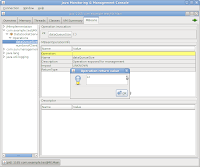

connect to the socket server using telnet/netcat or any of those tools.
On linux ...
netcat localhost 4233
Now invoking the same operations again gives you the following results...


The example used here is an application which is basically a Socket server serving clients with data from a queue. The use case here is to look at the app and query for number of clients connected or number of objects in the queue. pretty simple huh?
Here is the code for the app.
We will use JConsole to connect to the app process and invoke the operations defined.
Now you might say that this can be done by logging the information (queue size and number of clients). True but like I said earlier using JMX gives you a way to check on things at runtime. also you could have an operation to clear the queue for a secure user (how? check for later posts!). Also why do you want to waste cpu cycles and disk space to keep logging stuff which you may or not look for.
The Java artifacts you need are an interface that declares the methods that you want to expose, a class that implements that interface. That's it. TestJMX.java is just to create and register a JMX bean.
Interface....
package com.example.testJMX;

public interface DataSocketServerMBean {
 // operations
 public int numberofClients();
 public int dataQueueSize();
}
The implementor...
package com.example.testJMX;

import java.io.BufferedOutputStream;
import java.io.IOException;
import java.io.ObjectInputStream;
import java.io.ObjectOutputStream;
import java.io.OutputStream;
import java.net.ServerSocket;
import java.net.Socket;
import java.util.ArrayList;
import java.util.Collections;
import java.util.List;
import java.util.concurrent.ExecutorService;
import java.util.concurrent.LinkedBlockingQueue;


import org.apache.log4j.Logger;

public class DataSocketServer extends Thread implements DataSocketServerMBean {
 private final static Logger log = Logger.getLogger(DataSocketServer.class);
 private final static int LISTENING_PORT = 3000;
 private ServerSocket weatherDataServer;
 public boolean shutdown = false;
 protected LinkedBlockingQueue outputDataQueue;
 private ConnectToNewClient newClient;
 private boolean byteData;
 private int listeningPort;

 public DataSocketServer() throws Exception {
  weatherDataServer = new ServerSocket(LISTENING_PORT);
  log.info("Server listening on port " + LISTENING_PORT);
  this.start();
  //start a new thread for writing data to each client socket
  newClient = new ConnectToNewClient();
 }

 public DataSocketServer(LinkedBlockingQueue dataQueue) {
  this.outputDataQueue = dataQueue;

  try {
   weatherDataServer = new ServerSocket(LISTENING_PORT);
  } catch (IOException e) {
   log.error("Error creating ServerSocket :", e);
  }
  log.info("Server listening on port " + LISTENING_PORT);
  this.setName("WeatherDataSocketServerfor" + listeningPort);
  this.start();
  //start a new thread for writing data to each client socket
  newClient = new ConnectToNewClient();
 }

 public void run() {
  while (true) {
   try {
    log.debug("Waiting for connections.");
    if (weatherDataServer != null){
     Socket client = weatherDataServer.accept();
     log.info("Accepted a connection from: " + client.getInetAddress());
     newClient.addClient(new ClientSocket(client));
    }
    Thread.sleep(500);
   } catch (InterruptedException ix) {
    log.error("Shutting down socket server", ix);
    newClient.interrupt();
    break;
   } catch (Exception e) {
    log.error("Error accepting connections", e);
   }
  }
 }

 public void ConnectToClient(Socket clientSocket) {

 }

 /**
  * Helper class to handle each client as a separate thread.
  */
 class ConnectToNewClient extends Thread {
  // DECLARE
  private List clientSockets = Collections.synchronizedList(new ArrayList());

  // INIT
  public ConnectToNewClient() {
   this.setName("ConnectToNewClientFor" + DataSocketServer.this.listeningPort);
   this.start();
  }

  public void addClient(ClientSocket clientSocket) {
   clientSockets.add(clientSocket);
  }

  public ConnectToNewClient(ArrayList clientList) {
   this.clientSockets = clientList;
   this.setName("ConnectToNewClientFor" + DataSocketServer.this.listeningPort);
   this.start();
  }

  // ACTION
  public void run() {
   Object qobj = null;
   try {
    while (true) {
     while (clientSockets.size() > 0 && (qobj = DataSocketServer.this.outputDataQueue.peek()) != null) {
      log.info("Number of clients =" + clientSockets.size());
      //loop through each client and write to it.
      for (int i = 0; i < clientSockets.size(); i++) {
       ClientSocket clientSocket = null;
       try {
        //check if the socket is active.
        clientSocket = clientSockets.get(i);
        if (clientSocket.checkConnection()) {
         DataSocketServer.log.info("Sending data to client "
           + clientSocket.getInetAddress());
         if (DataSocketServer.this.byteData && qobj instanceof byte[])
          clientSocket.writeBytes((byte[]) qobj);
         else
          clientSocket.writeObject(qobj);
         DataSocketServer.this.outputDataQueue.remove(qobj);
        } else {
         //remove client from list
         DataSocketServer.log.info("Removing client from list : "
           + clientSocket.getInetAddress());
         clientSocket.close();
         clientSockets.remove(clientSocket);
         clientSocket = null;
        }
       } catch (RuntimeException e) {
        DataSocketServer.log.error("Error sending data to client ", e);
        //the client socket may be dead. remove it
        clientSockets.remove(clientSocket);
        clientSocket = null;
       }
      }
     }
     Thread.sleep(1000);
    }
   } catch (Exception e) {
    DataSocketServer.log.error("Error :", e);
    DataSocketServer.log.error("outputDataQueue =" + DataSocketServer.this.outputDataQueue);
    DataSocketServer.log.error("qobj = " + qobj);
   }
}
}

/**
* Socket wrapper for each client.
*/
class ClientSocket {
// DECLARE
private Socket socket = null;
private ObjectInputStream ois = null;
private OutputStream sos = null;
private ExecutorService executor;
private ObjectOutputStream oos = null;
private BufferedOutputStream bos = null;

// INIT
public ClientSocket(Socket clientSocket) {
this.socket = clientSocket;
try {
sos = socket.getOutputStream();
if (DataSocketServer.this.byteData)
bos   = new BufferedOutputStream(sos);
else
oos = new ObjectOutputStream(new BufferedOutputStream(sos));
} catch (Exception e1) {
try {
socket.close();
} catch (Exception e) {
log.error("Error creating client socket :" , e);
}
}
}

public void close() {
try {
socket.close();
if (oos != null)
oos.close();
if (bos != null)
bos.close();
} catch (Exception e) {
}
socket = null;
}

public void writeObject(Object o) {
try {
oos.flush();
if (o instanceof byte[]){
byte[] buf = (byte[])o;
bos.write(buf);
} else {
oos.writeObject(o);
}
oos.flush();
} catch (IOException e) {
// close socket.. connection maybe lost. The only way to find out is when
//we get a socketexception!!!!!!
log.error("Error writing to socket. closing socket...", e);
try {
socket.close();
} catch (IOException e1) {
}
socket = null;
} catch (Exception ex) {
log.error("Error writing data to client socket for client " + this.getInetAddress(),ex);
}
}

// UTIL
public boolean checkConnection() {
if (socket != null && !socket.isClosed() && socket.isConnected() && socket.isBound())
return true;
return false;
}

// ACCESS
public String getInetAddress() {
if (socket != null)
return socket.getInetAddress().getHostName();
return "";
}

public Socket getSocket() {
return socket;
}

public void writeBytes(byte[] buf) {
try {
if (socket != null) {
log.info("writing data " + new String(buf));
bos.flush();
bos.write(buf);
bos.flush();
}
} catch (IOException e) {
// close socket.. connection maybe lost. The only way to find out is when
//we get a socketexception!!!!!!
log.error("Error writing to socket. listening port: " + DataSocketServer.this.listeningPort + " closing socket...", e);
try {
socket.close();
} catch (IOException e1) {
}
socket = null;
} catch (Exception ex) {
log.error("Error writing data to client socket for client " + this.getInetAddress(),ex);
}
}
}

public int dataQueueSize() {
if (outputDataQueue != null)
return outputDataQueue.size();
return 0;
}

public int numberofClients() {
if (newClient != null)
return newClient.clientSockets.size();
return 0;
}

}
and finally the TestJMX class...
package com.example.testJMX;

import java.lang.management.*;
import java.util.Date;
import java.util.concurrent.LinkedBlockingQueue;

import javax.management.*;

import org.json.JSONObject;

public class Main {
    public static void main(String[] args) throws Exception {
    // Get the Platform MBean Server
    MBeanServer mbs = ManagementFactory.getPlatformMBeanServer();

    LinkedBlockingQueue testQueue = new LinkedBlockingQueue();
    JSONObject sampleObj = new JSONObject();
    sampleObj.put("The current time on host machine", new Date());
    testQueue.add(sampleObj.toString());
    sampleObj.put("The current time on host machine", new Date());
    testQueue.add(sampleObj.toString());
    sampleObj.put("The current time on host machine", new Date());
    testQueue.add(sampleObj.toString());
    sampleObj.put("The current time on host machine", new Date());
    testQueue.add(sampleObj.toString());
    sampleObj.put("The current time on host machine", new Date());
    testQueue.add(sampleObj.toString());
    sampleObj.put("The current time on host machine", new Date());
    testQueue.add(sampleObj.toString());
    sampleObj.put("The current time on host machine", new Date());
    testQueue.add(sampleObj.toString());
    sampleObj.put("The current time on host machine", new Date());
    testQueue.add(sampleObj.toString());
    sampleObj.put("The current time on host machine", new Date());
    testQueue.add(sampleObj.toString());
    sampleObj.put("The current time on host machine", new Date());
    testQueue.add(sampleObj.toString());
    sampleObj.put("The current time on host machine", new Date());
    testQueue.add(sampleObj.toString());
    sampleObj.put("The current time on host machine", new Date());
    testQueue.add(sampleObj.toString());

    // Construct the ObjectName for the MBean we will register
    ObjectName name = new ObjectName("com.example.testJMX:type=DataSocketServer");

    // Create the jmx MBean
    DataSocketServer mbean = new DataSocketServer(testQueue);

    // Register the jmx MBean
    mbs.registerMBean(mbean, name);

    // Wait forever
    System.out.println("Waiting forever...");
    Thread.sleep(Long.MAX_VALUE);
    }
}
Now run the TestJMX java class.
Launch JConsole and connect to the process
Invoking dataQueueSize and numberofClients operations...


connect to the socket server using telnet/netcat or any of those tools.
On linux ...
netcat localhost 4233
Now invoking the same operations again gives you the following results...


Tuesday, September 8, 2009
Capturing jvm Thread Dump in linux
Many a times it has happened that a Java app froze and I needed to take a thread dump to look for deadlocks or any other issues. In this case you need to perform a Thread dump on a running process. Using kill command with argument 3 produces a Thread dump, but the output goes to the stdout of the process, Which could be a console on your favorite IDE. What if the IDE is frozen too?
Well in that case using the /proc command comes in handy.
ls /proc lists all the processes running on the system currently.
Say we want to take a thread dump of a java process (PID 24772).
/proc/24772/fd/1 gets you the stdout interface of the Java process where 1 is the file-descriptor for stdout.
You can capture the output to stdoutby issuing the command
cat /proc/24772/fd/1
Now to generate a thread dump issue this from another session
kill -3 24772
You should see the thread dump output like this..
Well in that case using the /proc command comes in handy.
ls /proc lists all the processes running on the system currently.
my-desktop:~$ ls  /proc
1      2133   24921  3132  3615  3744         fb             partitions
10     2134   25     3135  3616  4            filesystems    sched_debug
11     2141   25214  3139  3618  4763         fs             schedstat
12     2142   26     3159  3629  5            interrupts     scsi
12087  22     26408  3163  3633  5587         iomem          self
13     2213   26426  3165  3639  6            ioports        slabinfo
14     2258   2881   3183  3645  7            irq            stat
1495   2281   29     3184  3654  722          kallsyms       swaps
15     2283   2913   3198  3656  8            kcore          sys
16     22886  2935   32    3658  856          key-users      sysrq-trigger
16653  22894  2938   3211  3664  9            kmsg           sysvipc
17     2306   2939   3240  3669  acpi         kpagecount     timer_list
18     23177  294    33    3671  asound       kpageflags     timer_stats
1865   23186  3      3316  3673  buddyinfo    latency_stats  tty
19     23191  30     3344  3674  bus          loadavg        uptime
19405  23194  3002   34    3679  cgroups      locks          version
19406  23197  30137  3466  3683  cmdline      mdstat         version_signature
19407  2330   3032   35    3685  cpuinfo      meminfo        vmallocinfo
19445  23701  3077   3536  3691  crypto       misc           vmstat
19988  2389   3080   3549  3694  devices      modules        zoneinfo
2      24     3081   36    3707  diskstats    mounts
20     2431   309    3606  3724  dma          mtrr
20798  24772  3099   3609  3728  driver       net
21     24803  31     3610  3740  execdomains  pagetypeinfo
Say we want to take a thread dump of a java process (PID 24772).
/proc/24772/fd/1 gets you the stdout interface of the Java process where 1 is the file-descriptor for stdout.
You can capture the output to stdoutby issuing the command
cat /proc/24772/fd/1
Now to generate a thread dump issue this from another session
kill -3 24772
You should see the thread dump output like this..
my-desktop:~$ cat  /proc/24772/fd/1
2009-09-08 10:41:19
Full thread dump Java HotSpot(TM) Client VM (14.2-b01 mixed mode, sharing):

"Low Memory Detector" daemon prio=10 tid=0x09060c00 nid=0x60d0 runnable [0x00000000]
   java.lang.Thread.State: RUNNABLE

"CompilerThread0" daemon prio=10 tid=0x0905dc00 nid=0x60ce waiting on condition [0x00000000]
   java.lang.Thread.State: RUNNABLE

"Signal Dispatcher" daemon prio=10 tid=0x0905c400 nid=0x60cd waiting on condition [0x00000000]
   java.lang.Thread.State: RUNNABLE

"Finalizer" daemon prio=10 tid=0x0904dc00 nid=0x60cc in Object.wait() [0xb5326000]
   java.lang.Thread.State: WAITING (on object monitor)
    at java.lang.Object.wait(Native Method)
    - waiting on <0x8bcd8918> (a java.lang.ref.ReferenceQueue$Lock)
    at java.lang.ref.ReferenceQueue.remove(ReferenceQueue.java:118)
    - locked <0x8bcd8918> (a java.lang.ref.ReferenceQueue$Lock)
    at java.lang.ref.ReferenceQueue.remove(ReferenceQueue.java:134)
    at java.lang.ref.Finalizer$FinalizerThread.run(Finalizer.java:159)

"Reference Handler" daemon prio=10 tid=0x09049400 nid=0x60ca in Object.wait() [0xb5377000]
   java.lang.Thread.State: WAITING (on object monitor)
    at java.lang.Object.wait(Native Method)
    - waiting on <0x8bcd89a0> (a java.lang.ref.Reference$Lock)
    at java.lang.Object.wait(Object.java:485)
    at java.lang.ref.Reference$ReferenceHandler.run(Reference.java:116)
    - locked <0x8bcd89a0> (a java.lang.ref.Reference$Lock)

"main" prio=10 tid=0x09023400 nid=0x60c6 runnable [0xb75e9000]
   java.lang.Thread.State: RUNNABLE
    at java.net.PlainSocketImpl.socketAccept(Native Method)
    at java.net.PlainSocketImpl.accept(PlainSocketImpl.java:390)
    - locked <0x8b8364b8> (a java.net.SocksSocketImpl)
    at java.net.ServerSocket.implAccept(ServerSocket.java:453)
    at java.net.ServerSocket.accept(ServerSocket.java:421)
    at org.coastal.log4jext.SocketServerAsWinService.main(SocketServerAsWinService.java:41)

"VM Thread" prio=10 tid=0x09047800 nid=0x60c9 runnable

"VM Periodic Task Thread" prio=10 tid=0x09062800 nid=0x60d1 waiting on condition

JNI global references: 945

Heap
 def new generation   total 960K, used 488K [0x8b7d0000, 0x8b8d0000, 0x8bcb0000)
  eden space 896K,  47% used [0x8b7d0000, 0x8b83a3b8, 0x8b8b0000)
  from space 64K, 100% used [0x8b8c0000, 0x8b8d0000, 0x8b8d0000)
  to   space 64K,   0% used [0x8b8b0000, 0x8b8b0000, 0x8b8c0000)
 tenured generation   total 4096K, used 467K [0x8bcb0000, 0x8c0b0000, 0x8f7d0000)
   the space 4096K,  11% used [0x8bcb0000, 0x8bd24f00, 0x8bd25000, 0x8c0b0000)
 compacting perm gen  total 12288K, used 373K [0x8f7d0000, 0x903d0000, 0x937d0000)
   the space 12288K,   3% used [0x8f7d0000, 0x8f82d6a0, 0x8f82d800, 0x903d0000)
    ro space 8192K,  74% used [0x937d0000, 0x93dca2a8, 0x93dca400, 0x93fd0000)
    rw space 12288K,  59% used [0x93fd0000, 0x946e7878, 0x946e7a00, 0x94bd0000)
Subscribe to:
Posts (Atom)